Canonical SEO: How to Use a Canonical URL Without Errors


Duplication on a website rarely starts with copying an entire article. Much more often, it arises for technical reasons: a single page appears at the base URL, with a campaign parameter, after sorting, with a filter, or in several product variations. To the user, the difference may be almost imperceptible, but Google sees separate URLs and must decide which one best represents the content.
A canonical URL helps tell the search engine which version is preferred. However, it does not eliminate the source of the confusion and does not function as an absolute directive. Google may accept the recommendation, but it may also choose a different URL if the page content or other technical signals are inconsistent.
For larger e-commerce sites, migrations, and structural changes, it’s worth checking canonical tags as part of an SEO audit. Analyzing a single tag isn’t enough when the XML sitemap, redirects, and internal linking point to different URL versions.
You can find more practical resources on technical SEO on our blog.
Key Takeaways
- The canonical tag indicates the preferred version among a group of duplicate or very similar pages. Google still makes the final decision on its own.
- The strongest effect comes from consistent signals: the canonical tag, redirects, the XML sitemap, and internal linking should all point to the same URL.
- The canonical URL should be accessible to the crawler, return a valid response, be indexable, and present content consistent with the duplicate.
- A canonical tag does not replace noindex, redirects, or editorial decisions. Each of these mechanisms addresses a different issue.
What is a canonical URL?
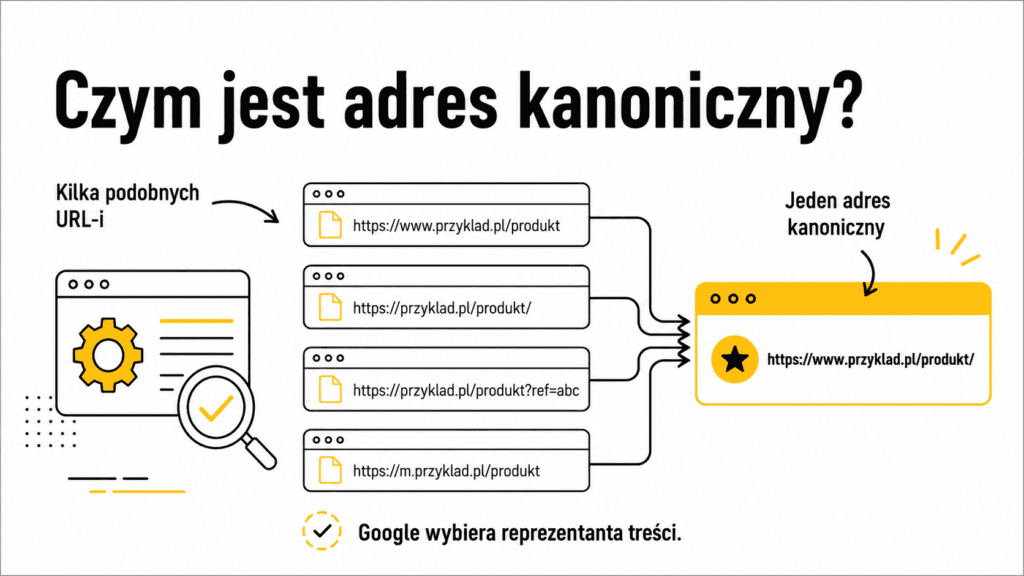
Canonicalization is the process of selecting a representative URL for a set of pages that contain the same or very similar content. The version selected as canonical is the URL that Google most often wants to index and display in search results.
A website owner can indicate the preferred version using the rel=”canonical” tag, but this is a strong signal, not a command. Google builds a group of similar pages and compares various pieces of information: content, redirects, canonical tags, XML sitemaps, internal links, the HTTPS protocol, and relationships between language versions. If these signals align, the likelihood of selecting the expected URL increases.
A canonical tag does not mean that alternative versions cease to exist. Users can still open them, Google can recrawl them, and analytics tools can track traffic on them. The mechanism is primarily used to consolidate signals and select a representative version of the content for the index.
Where do duplicate URLs come from?
The same content can appear under multiple URLs even on a properly functioning website. Not every duplication is the result of an error, but every large group of similar URLs requires a deliberate decision.
- tracking parameters for campaigns, traffic sources, and user sessions,
- sorting products by price, popularity, or date,
- category filters that create many combinations of attributes,
- different paths leading to the same product or article,
- versions with or without a slash, in uppercase, or with a different protocol,
- printable versions, PDF files, or alternative formats of the same content,
- product variants that differ only in color, size, or a minor parameter,
- copies created by the CMS, staging, migration, or incorrect routing rules.
However, you should not assume that every similar URL is a duplicate. If a filter generates a page that corresponds to a distinct user query, has its own content, and can function as a standalone landing page, it may require a self-canonical tag instead of pointing to a parent category.
When does a canonical tag make sense?
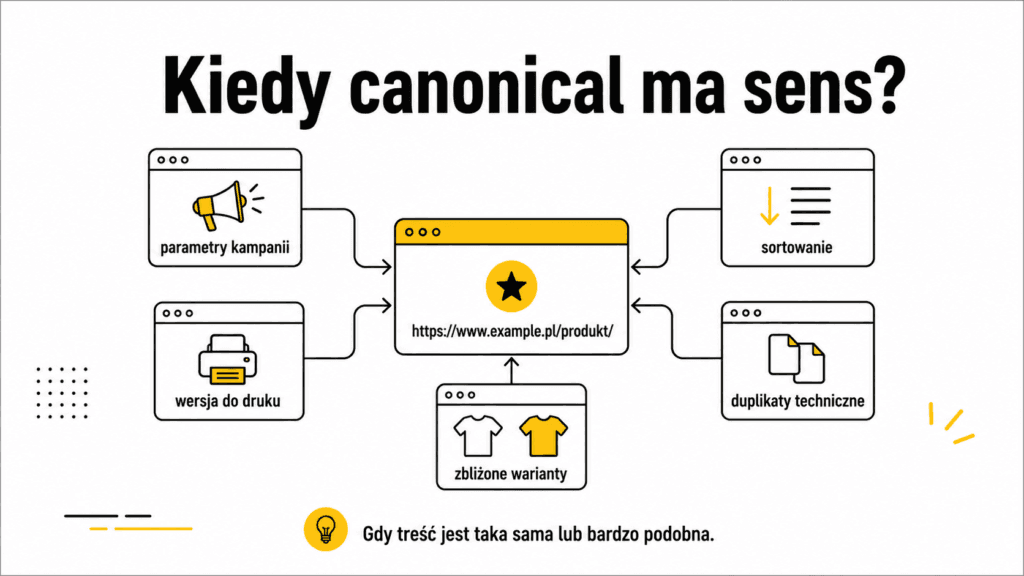
A canonical URL is the right solution when several available URLs present the same or very similar content, and all versions should remain accessible. The most common uses include:
- plain URLs and their versions with tracking parameters,
- sorting that changes the order but not the content,
- a print version and the main article,
- alternative URL paths leading to the same subpage,
- similar product variants that do not have separate search potential,
- the same document available as an HTML page and a file in a different format,
- technical duplicates resulting from CMS changes or migrations, if the URLs cannot be redirected immediately.
An important condition is content similarity. The canonical tag should not be used to link pages that describe different products, answer different questions, or serve different purposes. In such cases, Google may ignore the canonical tag, and the user will lose access to the correct result.
When should you not use a canonical tag?
A canonical tag is not a universal mechanism for controlling indexing. The choice of solution should depend on the intended status of the URL.
- If the old URL has been permanently replaced and users should no longer be directed to it, a 301 or 308 redirect is preferable.
- If the page is to remain accessible but should not appear in search results, a `noindex` tag may be necessary.
- If the resource has been removed and there is no meaningful equivalent, a 404 or 410 status code is appropriate.
- If two subpages serve different purposes, they should remain separate URLs or be editorially restructured.
- If the content is private, the canonical tag does not provide protection. Authorization or access restrictions are required.
The differences between a robot’s access and a page’s presence in the index are explained in more detail in the article on robots.txt and noindex. The canonical tag should not be used interchangeably with any of these mechanisms.
Canonical, noindex, redirect, or a 404 error?
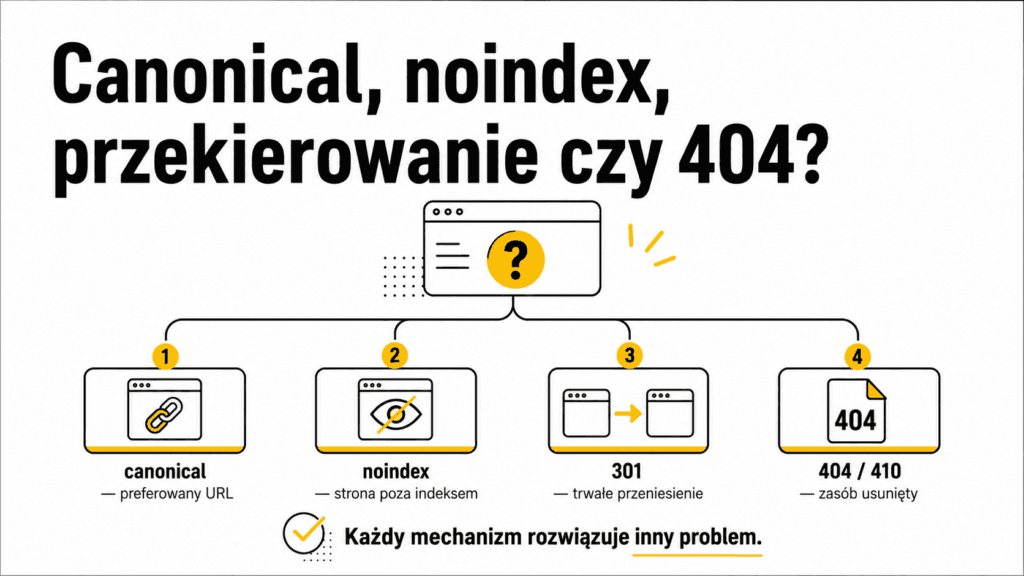
The simplest way to choose a mechanism is to answer the question: What should happen to the user, the content, and the URL?
Canonical: The page remains accessible, but a different, very similar URL is to be preferred in search results and will inherit the consolidated signals.
Noindex: The page still works for users, but after being recrawled, it should not be included in the index.
301 or 308 Redirect: The old URL has been permanently moved. Both users and search engine bots should be automatically directed to the new location.
404 or 410 status code: The content has been removed, and there is no suitable replacement to which the user can be redirected.
Robots.txt: The purpose is to restrict crawling of specific paths. It is not a tool for selecting a canonical page.
How do you properly implement a canonical URL?
For HTML pages, the canonical tag is usually set in the page’s metadata section. For non-HTML files, such as PDFs, the information can be included in the server’s response header. Regardless of the implementation method, the same set of rules applies:
- use a full, absolute URL with the protocol and domain,
- specify a single, unambiguous canonical URL per page,
- on the canonical page, use a self-canonical tag—that is, specify its own URL,
- point the canonical tag directly to the target page, without a redirect chain,
- make sure the specified URL returns a valid response and can be indexed,
- do not point the canonical tag to a page with a `noindex` tag, a 404 error, access blocked, or significantly different content,
- Include the canonical version in the XML sitemap, and direct internal links primarily to it,
- for client-side rendered sites, do not change the canonical tag in a way that conflicts with the original page code.
A self-canonical tag is not a technical requirement for a page to appear in Google, but it is a recommended standard. It helps reduce ambiguity when parameters are appended to the URL or when a CMS creates an alternative version of the URL.
What signals does Google take into account?
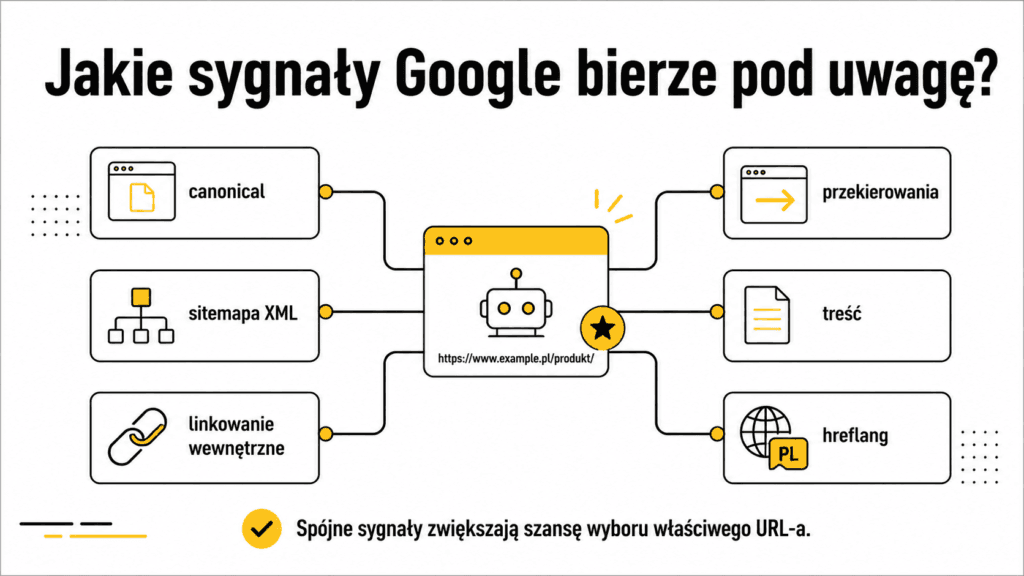
Google does not evaluate the canonical tag in a vacuum. It analyzes a whole set of signals that may reinforce or contradict one another. The most important ones include:
- permanent redirects leading to the preferred URL,
- the `rel=”canonical”` tag on both the alternative and canonical pages,
- the presence of the preferred URL in the XML sitemap,
- consistent internal linking to the canonical version,
- similarity in the main content between pages,
- secure HTTPS protocol and stable server response,
- consistency between the canonical tag and hreflang on multilingual sites,
- a canonical tag that is visible after the page is rendered and is not overridden by JavaScript.
A large number of inconsistent duplicates can also unnecessarily consume your crawl budget. The canonical tag helps organize groups of similar URLs, but the best results come from removing the source of excessive duplication.
Why might Google ignore the canonical tag?
If Google selects a different canonical page than the site owner, this does not automatically mean an algorithm failure. Most often, the search engine has determined that the specified URL is not the best representative of the group, or other signals point to a different page.
- the content of the referring page and the target page is too different,
- the canonical tag points to a non-indexable, invalid, or redirected URL,
- the sitemap points to a different URL than the canonical tag,
- most internal links lead to a non-canonical version,
- the CMS generates a second canonical tag or changes it after rendering,
- language versions point to a single shared URL in a different language,
- the server returns the same content for unrelated domains or incorrectly handles hosts,
- the duplicate is, in practice, more complete, stable, or more accessible than the specified version.
In Google Search Console, it’s worth comparing the “user-declared canonical URL” with the “canonical URL selected by Google.” The difference between them is the starting point for a diagnosis, not a definitive answer. You need to check the entire group of URLs, as well as their actual content and technical signals.
The most common canonical errors
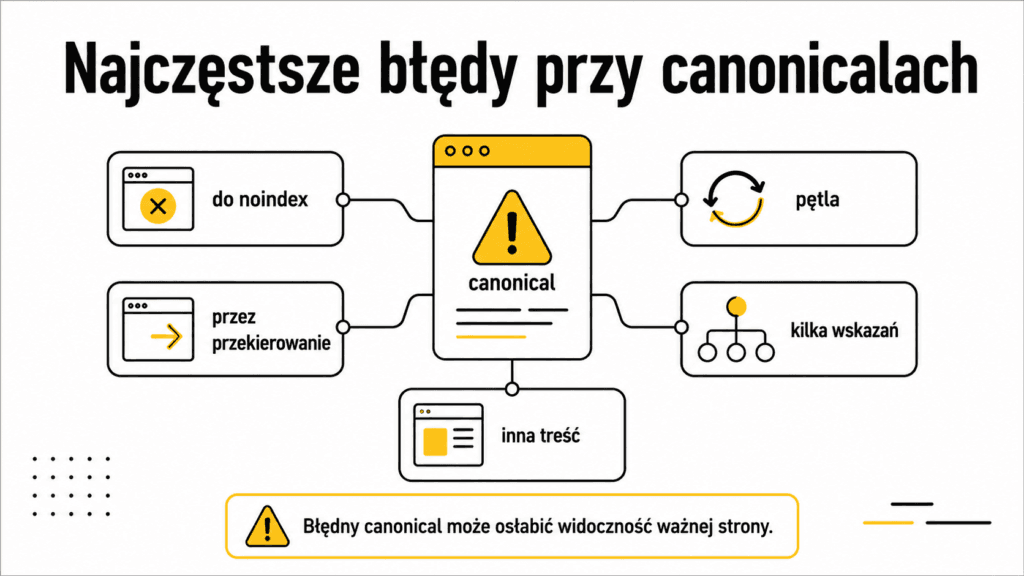
Canonical pointing to a page with `noindex`: The canonical tag points to a URL that Google should not index. The signals are contradictory and may be ignored.
Canonical via a redirect: The crawler must take an extra step, and the intended signal becomes less clear. It’s better to specify the final URL directly.
Canonical chains: Page A points to B, and B points to C. This unnecessarily complicates the selection; each alternative should point directly to the target version.
Canonical loop: Pages point to each other. In this situation, there is no unambiguous representative for the group.
Multiple different canons: A plugin, template, and server header may generate different canonical tags. Google may then ignore all of them.
Canonical pointing to a page with different content: This mechanism is not intended to merge accidentally similar URLs or to hide architectural issues.
Linking to duplicates: The site declares a single canonical, but the menu, filters, and articles consistently redirect to an alternative version.
All pagination pages point to the first page: Subsequent pages in the list often contain different products or articles, so they are not exact duplicates of the first page.
Automatic canonical tag to the parent category: A variant or filter with its own intent may lose the opportunity to be indexed, even though it deserves its own URL.
How to check canonical tags step by step?
It’s best to conduct the diagnosis in a consistent order. This makes it easier to distinguish a problem with a single tag from an error generated by the CMS or the entire site structure.
- Determine which URL should appear in Google and why that specific URL should represent the content in question.
- Check whether alternative pages are actually duplicates or very similar variants.
- Verify the canonical tag visible in the page source and after rendering. Make sure there aren’t multiple different canonical tags.
- Open the target URL and check its response code, accessibility to the crawler, the `noindex` tag, and its own self-canonical tag.
- Compare the canonical tag with the XML sitemap, redirects, and internal linking.
- In Search Console, check the URL declared by the site owner and the URL selected by Google.
- Analyze the pattern for the entire group, such as all category parameters or product variants.
- After making corrections, request a re-check of the most important URLs and monitor whether Google has restructured the group of duplicates.
During the analysis, it’s also worth checking whether internal linking supports the canonical version. If a website declares one URL but directs users and crawlers to a different one at every turn, the canonical tag is essentially trying to go against the grain of the entire site architecture.
Practical Scenarios and Appropriate Solutions
Campaign and tracking parameters
The base URL and the version with a campaign parameter usually display identical content. The version with the parameter can designate the clean URL as the canonical one. Internal linking and the XML sitemap should use the version without parameters; parameters are needed only to measure the source of the visit.
Sorting and filters in an online store
Not all combinations should be treated the same. Sorting that only changes the order of products can usually point to the parent category. A filter that creates a valuable page—for example, a specific product type corresponding to real search queries—may, however, require its own URL, content, self-canonical, and placement in the site’s linking structure.
First, you need to divide the URLs into groups: valuable landing pages, similar variants, exact duplicates, and traps that generate virtually infinite combinations. The canonical tag is one of the tools, not a one-size-fits-all rule for all filters.
Product Variants
If colors or sizes have nearly identical descriptions, the same availability, and a shared intent, the variants can point to the main product. If variants have distinct names, parameters, search queries, and content, automatic consolidation may be a mistake. In this case, each page can remain canonical for itself.
Category or Blog Pagination
The second, third, and subsequent pages of a list typically display different products or articles. Therefore, they are not exact duplicates of the first page. In most cases, each pagination page should point to itself, remain accessible to the crawler, and lead to the items located at that level of the list.
Page after migration or URL change
If the old URL has been permanently replaced by a new one, the canonical tag should not replace a redirect. The proper approach is to set up a permanent redirect to the most appropriate destination page, update internal links and the XML sitemap, and set a self-canonical tag on the new URL.
Language and regional versions
Each full language version should typically designate itself as the canonical version. The `hreflang` attribute links language equivalents, while the `canonical` tag selects a representative within the content of a given language. Pointing all languages to a single version may cause the others to disappear from search results.
Content Published on Another Site
Cross-domain canonical tags are technically possible but should not be treated as a reliable way to control syndication. Google indicates that, in the case of partner publications, a more effective solution is to exclude the partner’s copy from indexing if the goal is to preserve the original as the sole version in search results. This requires an agreement with the publisher, not just a tag on the source page.
PDF File and HTML Version
If the same content exists as both an HTML page and a PDF file, you can specify the preferred version for the non-HTML document as well by using the server response header. The decision should depend on which format should be the primary search result and better serves the user.
Canonical vs. Content Cannibalization
Content cannibalization and duplication are not the same problem. A canonical tag can help when several URLs contain the same or nearly the same content. However, it is not a standard solution for multiple articles that answer similar but distinct questions.
If two pages compete for the same search intent, you need to evaluate their roles. Sometimes the best approach is to merge the content and redirect the weaker URL. Other times, it’s enough to separate the topics, change the titles, expand sections, and reorganize the linking structure. Using a canonical tag without this analysis can hide a page that should remain an independent source of traffic.
Expert insight: The canonical tag should reinforce the site architecture, not replace it
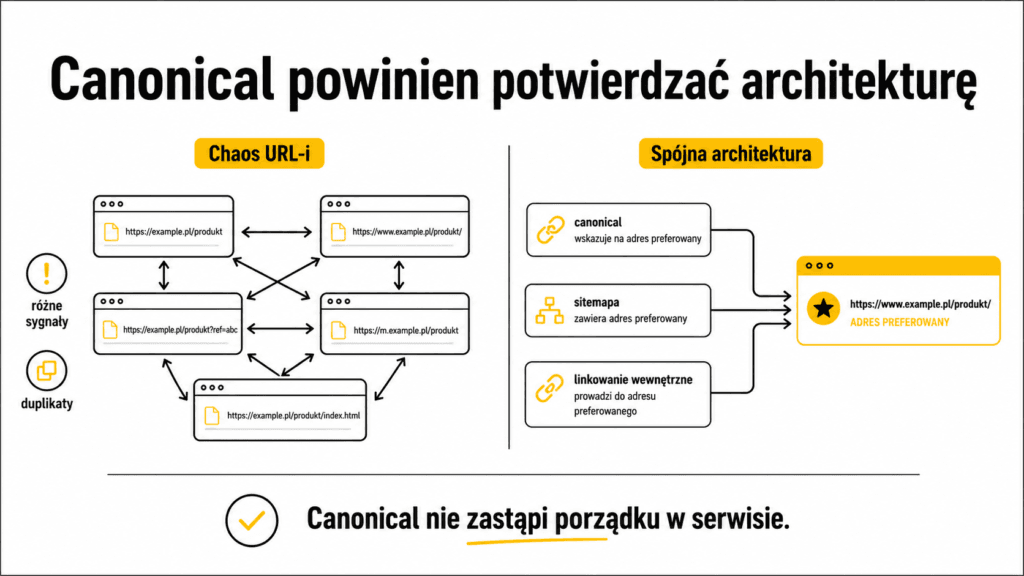
The safest implementations don’t start by mass-adding the tag to every parameter. They start with a map of URL types: which addresses are valuable landing pages, which are variants, which should be redirected, and which shouldn’t be created at all.
Canonical works best when it reinforces a decision that’s consistent across the entire site. The preferred URL is listed in the XML sitemap, receives internal links, responds without a redirect, has full content, and includes a self-canonical tag. This way, Google receives a single, clear message instead of a technical chorus singing six different tunes.
On large websites, organizing canonical tags should be part of a broader SEO optimization strategy that includes URL generation, linking, sitemaps, indexing, and migrations.
Mini-checklist for proper canonical tag implementation
- Are the pages actually duplicates or very similar variants?
- Has a single specific URL been selected to appear in search results?
- Does the canonical tag use the full, absolute URL?
- Does the target URL return a 200 status code and is it accessible to Googlebot?
- Does the canonical page not have a “noindex” tag and is it not blocked?
- Does the canonical tag lead directly to the target page, without a query string?
- Are there any loops or conflicting instructions?
- Does the XML sitemap include the canonical version?
- Do internal links primarily point to the canonical version?
- Is the self-canonical tag set on important, indexable pages?
- Does the hreflang attribute point to canonical equivalents in the same language?
- Was the result checked in Google Search Console after the site was recrawled?
FAQ
Does the canonical tag remove a page from the index?
It doesn’t work like `noindex`. It informs Google that another very similar URL is preferred. The alternative URL may remain known to the search engine, but its signals and presentation in search results may be consolidated with the canonical version.
Should every page have a self-canonical tag?
Google doesn’t require a canonical tag on every page, but a self-canonical tag is the recommended standard for important, indexable URLs. It helps in situations where the same URL is accessed with a parameter or an alternative path.
Does a canonical tag pass link equity?
A canonical tag helps consolidate signals from similar pages, including signals from links pointing to them. However, it is not a guarantee identical to a redirect and should be supported by a consistent site architecture.
Can a canonical tag point to a different domain?
Yes, Google may take cross-domain canonical tags into account. However, this is not a reliable way to control syndicated content, and in the case of partner publications, it may be more effective to exclude copies from indexing.
Can you set a canonical tag to a page with a `noindex` directive?
This is not a valid combination. The canonical URL must be indexable. Otherwise, the page sends two conflicting signals to Google.
Is a canonical tag pointing to a redirected page an error?
It’s best to specify the final URL that responds without a redirect. A canonical tag that follows a chain of redirects makes interpretation difficult and may be ignored.
Should all URL parameters point to the base page?
No. Tracking parameters and exact duplicates usually should, but useful filters may serve a distinct intent and require their own self-canonical.
Does the canonical tag solve keyword cannibalization?
Only if the competing URLs are actual duplicates. If the content answers different questions, an editorial decision is needed to either consolidate or separate the search intents.
How can you check which canonical URL Google has chosen?
In the URL Inspection tool in Google Search Console, you can compare the URL declared by the site owner with the one selected by Google. Keep in mind that changes after corrections aren’t always immediate.
Can a canonical tag point to the first page of pagination?
This should not be done automatically. Subsequent pages in the list usually contain different content and are not duplicates of the first page; therefore, they should most often have a self-canonical tag.
Summary
Canonical SEO is a tool for organizing duplicate and very similar URLs. It helps identify the preferred version, consolidate signals, and reduce situations where Google must independently choose among multiple technical variants.
However, effective implementation requires consistency. Canonical tags, XML sitemaps, redirects, internal linking, hreflang, and page content should all support the same decision. If one element points to version A while the others lead to B, Google may ignore the declaration and choose its own representative.
The most important rule is this: the canonical tag should describe the actual relationship between similar pages, not mask problems with architecture, content quality, or the URL structure. Only then is it a precise technical SEO tool, rather than a Band-Aid stuck on a broken pipe.
See also: Structured Data for SEO: How Does Schema Help Google Understand a Page?


