SEO Website Migration: How to Migrate a Website Without Losing Organic Traffic?


A new website may be faster, more user-friendly, and better tailored to the company’s needs, yet still lose some organic traffic after launch. Most often, this isn’t due to the redesign itself, but rather to a break in the relationship between old and new URLs, the removal of valuable content, or incorrect indexing settings.
SEO website migration is the process of safeguarding visibility when changing the domain, URL structure, CMS, hosting, technology, information architecture, or a large portion of the content. It should begin before the new site structure is approved, because once the site goes live, recovery options are usually more expensive and less predictable.
It’s worth considering SEO as early as the design phase of a new website, before URLs, category structure, and content migration methods are finalized. For larger projects, an SEO audit should also serve as a starting point, as it helps identify subpages that generate traffic, conversions, and backlinks.
You can find more practical resources on website visibility and growth on our SEO and marketing blog.
Key Takeaways
In short: A safe migration isn’t just about mechanically copying a website. You need to recreate the relationships between old and new URLs, preserve the most important content, implement proper redirects, and check indexing and analytics after publication.
- The greatest risk arises when URLs change and old pages do not receive direct redirects to their correct counterparts.
- The migration should include data from Google Search Console, analytics, crawling tools, the CMS, and the external link profile.
- 301 or 308 redirects are just one element. You also need to update canonical tags, the XML sitemap, internal linking, hreflang, structured data, and the robots.txt file.
- After implementation, you should monitor not only traffic but also response codes, indexing, 404 errors, forms, conversions, and server logs.
- Temporary fluctuations in visibility may occur, but a sharp drop in specific sections often indicates an error that needs to be diagnosed quickly.
What is an SEO website migration?
SEO migration is a set of actions aimed at preserving as much of the old website’s value as possible when launching a new version. It encompasses technical elements as well as content, information architecture, analytics, and user paths.
The most important unit of migration is not the “entire website,” but the individual URL. For each old URL, you must decide whether it remains unchanged, receives a new equivalent, is redirected to different content, or should be removed. Google processes the migration at the level of individual URLs, so failing to map even a small but important group of pages can result in a loss of traffic.
What Changes Constitute an SEO Migration?
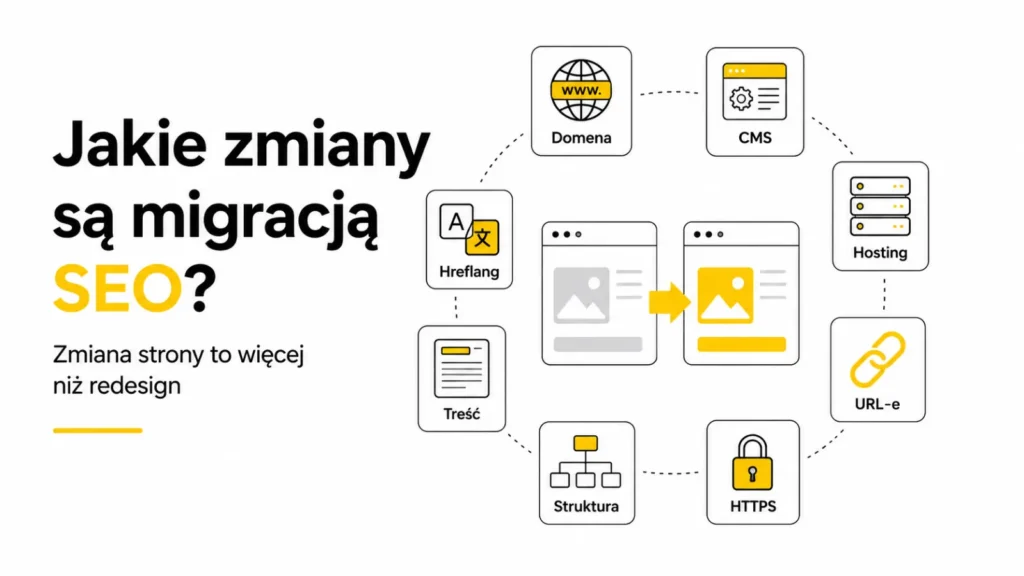
The risk does not depend solely on the visual scale of the project. A minor change in appearance may not affect indexing, while a seemingly simple change in URL conventions can impact thousands of subpages.
- changing the domain, subdomain, or switching from www to non-www and vice versa,
- switching from HTTP to HTTPS,
- changes to the structure of URLs, categories, or folders,
- implementing a new CMS or e-commerce platform,
- a change in hosting, server, CDN, or page rendering method,
- a redesign combined with a restructuring of the information architecture,
- merging several websites into one,
- splitting a single website into several domains or sections,
- mass deletion, merging, or migration of content,
- changes to language versions, hreflangs, or regional domains.
Important distinction: Changing the hosting provider without changing public URLs requires a different plan than a migration involving URL changes. In both cases, the new infrastructure must be tested, but a full redirect map is only necessary when URLs are changed.
Why does organic traffic drop after a migration?

The drop usually doesn’t have a single cause. The new version may simultaneously lose some content, change URLs, degrade backlink quality, and send conflicting technical signals to Google. In that case, the search engine must rediscover the site’s structure and decide which pages should replace the old results.
- Old URLs return a 404 error instead of redirecting to the corresponding new pages,
- many URLs have been redirected to the homepage or an unrelated category,
- valuable text, headings, or product data have been shortened or removed,
- the new version still has a “noindex” tag or a block in robots.txt left over from staging,
- canonical tags point to old URLs, the test environment, or non-indexable pages,
- internal links still point to the previous URLs,
- the XML sitemap contains old, redirected, or incorrect URLs,
- the server responds slowly or generates 5xx errors during heavy crawling,
- the mobile version has less content, different links, or lacks structured data,
- tracking has stopped working, causing actual traffic to be mistaken for a measurement issue.
Start Before Designing the New Structure
The safest migration begins before mockups and coding. First, you need to determine which elements of the current site drive visibility and business value. Only then can you decide what stays, what changes URLs, and what can actually be removed.
Google recommends avoiding combining several major changes at once whenever possible. Changing the domain, CMS, visual design, and content all at once during a single implementation increases the number of variables and makes it harder to pinpoint the cause of any potential traffic drop. For large websites, it’s worth considering a phased approach or testing on a lower-risk section.
What data should you collect before migration?
Your baseline should be a complete picture of the old website. A single data source isn’t enough, because a sitemap may not include all active URLs, and analytics won’t show URLs with no current traffic that still have external links.
- a full crawl of the site, including response codes, titles, headers, canonical tags, and robots directives,
- URLs from the XML sitemap and the sitemap index,
- pages generating clicks and impressions in Google Search Console,
- landing pages from organic traffic and other channels in Analytics,
- URLs responsible for forms, purchases, phone calls, and other conversions,
- subpages containing valuable external links,
- URLs visited by bots and users in server logs,
- PDFs, images, videos, and other resources that drive traffic or links,
- orphaned pages that are not accessible via the navigation but are still indexed by Google,
- the current structure of data, hreflangs, canonicals, and internal linking.
Save a baseline: Before implementation, export the most important data and keep a crawl of the old site. Without a baseline, it’s difficult to assess later whether a specific subpage lost traffic due to the migration, seasonality, or a previous trend.
URL Map: The Most Important Migration Document
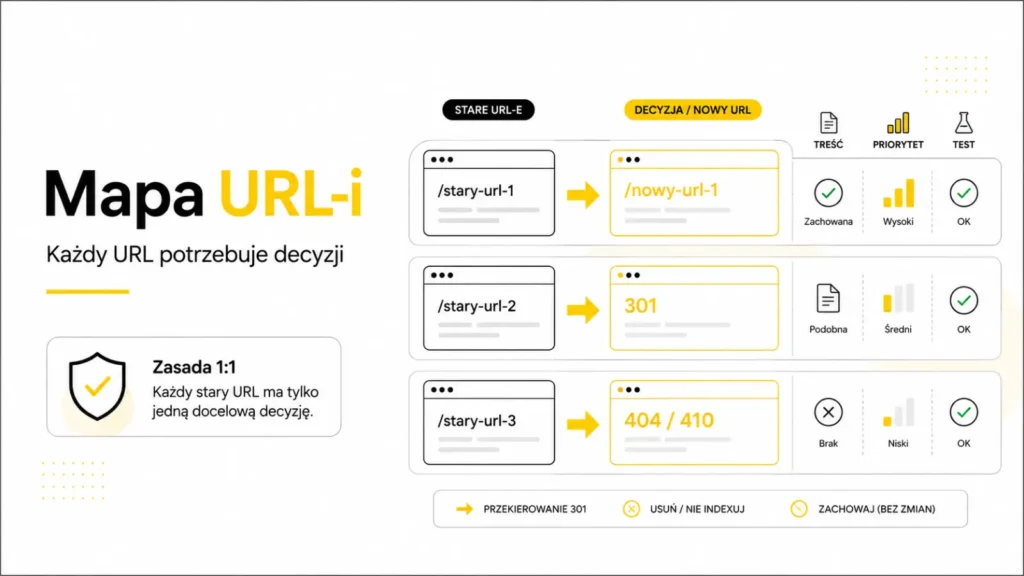
The migration map links each old URL to its target destination. It’s not just a list of redirects. It should also specify whether the content is retained, merged, deleted, or moved to a different type of subpage.
- old URL,
- new URL or information that no equivalent exists,
- target response code,
- page type and priority,
- organic traffic, conversions, and external links,
- content and metadata migration status,
- canonical, hreflang, and presence in the sitemap,
- person responsible for implementation and testing.
In an ideal scenario, the old URL leads directly to the closest new equivalent. If several old pages have indeed been merged into one, they may point to a shared, expanded subpage. However, you should not mass-redirect unrelated URLs to the homepage, as this pattern is confusing for users and may be treated as a soft 404.
How do you set up 301 redirects?

For permanent URL changes, the safest solution is to use server-side 301 or 308 permanent redirects. These inform both users and search engines that the content has been moved to a new location.
- Redirect the old URL directly to the final page,
- avoid chains where the old address leads through several consecutive URLs,
- detect redirect loops before publishing,
- do not redirect all deleted pages to the homepage,
- do not redirect to URLs with “noindex,” a 404 error, or another redirect,
- Keep parameters only if they are needed in the new structure,
- test both popular pages and rules covering entire groups of URLs,
- keep redirects in place for as long as possible; Google generally recommends at least one year.
Redirects should work in conjunction with canonical URLs. New pages should point to their own current URLs, not to old locations or URLs accessed through subsequent redirects.
Content, Metadata, and Page Intent
A migration often becomes an excuse to shorten descriptions, remove sections, or merge subpages. Such changes may be justified, but they should be based on analysis, not on the need to implement a new design more quickly.
- Preserve the main topic and intent of pages that generate valuable traffic,
- Transfer relevant headings, content, product data, FAQs, and elements that build credibility,
- Do not mechanically copy errors from the old version; correct the content where analysis indicates a genuine need,
- When merging multiple pages, prepare a single comprehensive piece of content and redirect the old URLs to their new equivalents,
- Check SEO titles, descriptions, H1 tags, image alt text, and structured data,
- ensure that the new version meets at least the same user needs as the old one.
Internal Linking After Migration
Redirects are necessary for old URLs, but the new site should not permanently rely on them for its own navigation. Menus, breadcrumbs, articles, categories, and recommendation modules should link directly to the new URLs.
Well-planned internal linking helps Google discover the new structure, strengthens the most important subpages, and reduces the number of unnecessary redirects. After implementation, it’s a good idea to recrawl the site and search for all links leading to old URLs, 404 errors, and non-canonical URL versions.
Staging: How to Test Without Letting the Draft Version Get Indexed by Google?

The testing environment should allow for full control over functionality, content, and performance, but it must not compete with the production version in search results. The safest approach is to restrict access via a password, VPN, IP addresses, or server-side mechanisms.
If `noindex` is used on the staging environment, you must verify before publication that the directive hasn’t been carried over to production. Simply blocking the entire test version in `robots.txt` hinders technical verification by tools and does not protect content from users.
The difference between controlling crawling and excluding a page from the index is explained in a separate article on robots.txt and noindex.
What should you test on the pre-production version?
Testing shouldn’t be limited to clicking on a few subpages. You need to test the new version as if it were a separate website and then compare it to the saved state of the old site.
- availability of all templates and page types,
- response codes and the behavior of non-existent URLs,
- a complete map of redirects, chains, and loops,
- canonical tags, noindex, robots.txt, and HTTP headers,
- the XML sitemap and the presence of only target URLs,
- internal linking, breadcrumbs, and mobile navigation,
- hreflang and language versions,
- structured data and rich results elements,
- content and link rendering on JavaScript-based websites,
- forms, shopping cart, payments, search, and filters,
- GA4, Google Tag Manager, ad pixels, and conversion goals,
- Core Web Vitals, server performance, and mobile behavior,
- images, PDF documents, downloadable files, and static resource URLs.
Website Migration vs. UX and Conversions
Maintaining search rankings isn’t enough if the new site makes it difficult for users to find your offerings or submit a form. That’s why SEO testing should go hand in hand with monitoring key user paths.
- Are the most important services and categories still accessible from the menu,
- whether popular landing pages have been buried deeper in the site structure,
- do the forms have the same or better fields, validation, and messages,
- Does the mobile version retain the desktop’s content and features?
- Do filters and the search function yield useful results?
- whether contact buttons, phone numbers, and purchase paths are tracked,
- whether a user arriving from an old link receives the correct context on the new page.
Migration Day: Order of Operations
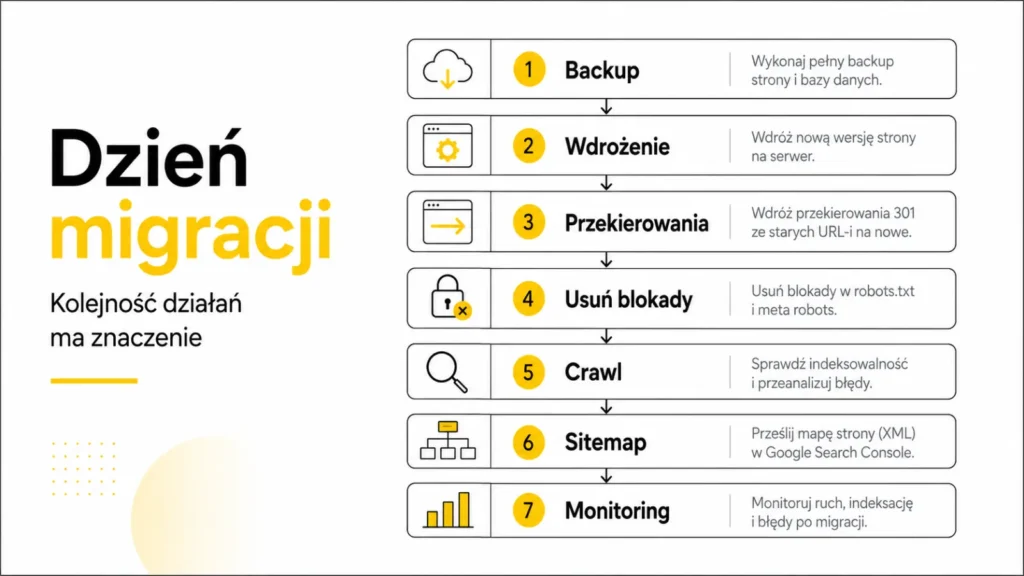
- Make a final backup of the data, configurations, and address lists.
- Deploy the new version and activate the scheduled redirects.
- Remove staging blocks, noindex tags, and rules that hinder production crawling.
- Check the homepage, key templates, forms, payments, and analytics.
- Run a quick crawl of the new URLs and test redirects for the old addresses.
- Verify canonical tags, hreflang, structured data, robots.txt, and the XML sitemap.
- Submit the new sitemap to Google Search Console.
- When changing domains, use the Change of Address tool in Search Console, provided its requirements are met.
- Monitor server logs, 404 and 5xx errors, and real-time traffic.
- Document all detected issues, the people responsible, and the date for retesting.
Contingency plan: Before deployment, establish the conditions for rolling back the migration. If key features aren’t working, a large number of URLs are returning errors, or the production environment is blocked from being indexed, a quick rollback may be safer than fixing the site while it’s live.
Post-migration monitoring: what to check and when?

The migration isn’t complete once the site goes live. Google must revisit old and new URLs, process redirects, and rebuild canonical groups. The time required depends on the number of URLs, server speed, and crawl frequency.
The first 24 hours
- availability of the site and key features,
- server errors, 404s, and redirect loops,
- functioning of the most important one-to-one redirects,
- robots.txt, noindex, canonical tags, and XML sitemaps,
- GA4, GTM, forms, phone calls, and transactions,
- server logs and Googlebot access to the new infrastructure.
First week
- Page Indexing report and the URL Inspection tool,
- changes in the number of indexed old and new URLs,
- an increase in “not found” and “redirected page” errors and canonical issues,
- clicks and impressions for the most important categories and page types,
- organic traffic and conversions by landing page,
- internal links pointing to old or incorrect URLs.
The following weeks
- visibility of keyword groups and key subpages,
- gradual traffic takeover by new URLs,
- URLs for which Google has chosen an unexpected canonical tag,
- sections that are crawled too infrequently or generate an excess of duplicates,
- server performance, Core Web Vitals, and log data,
- conversions, traffic quality, and user behavior.
On large websites, migration may temporarily increase server load and the number of bot visits. It’s also worth considering the crawl budget, especially when the new structure generates many parameters, filters, or unnecessary URL variations.
The Most Common Mistakes During Website Migration
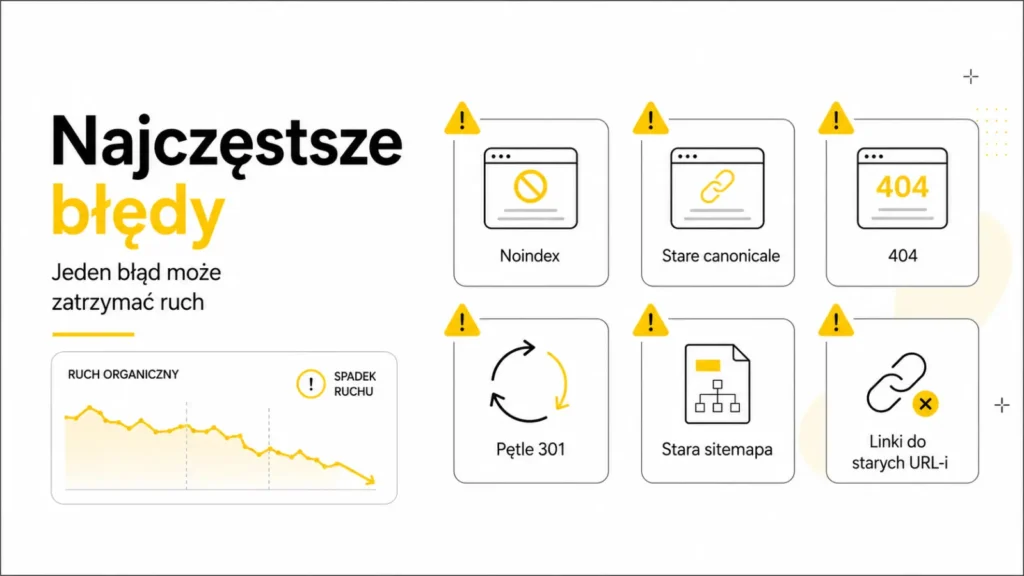
- starting SEO work only after the new version goes live,
- failing to compile a complete list of old URLs and relying solely on the sitemap for the migration,
- redirecting all URLs to the homepage,
- redirect chains and loops,
- leaving “noindex” tags or robots.txt blocks on the production site,
- canonical tags, hreflang attributes, and structured data pointing to old URLs,
- removing content that drove traffic or conversions,
- failure to update internal linking, ads, profiles, and key external links,
- an XML sitemap containing errors, redirects, or URLs outside the new structure,
- failure to test forms, payments, and conversion tracking,
- simultaneous changes to the domain, CMS, structure, and all content without the ability to distinguish the effects,
- shutting down the old hosting before traffic and crawlers have fully migrated to the new infrastructure,
- no one responsible for decisions and priorities after implementation.
Practical Migration Scenarios
Changing the URL structure
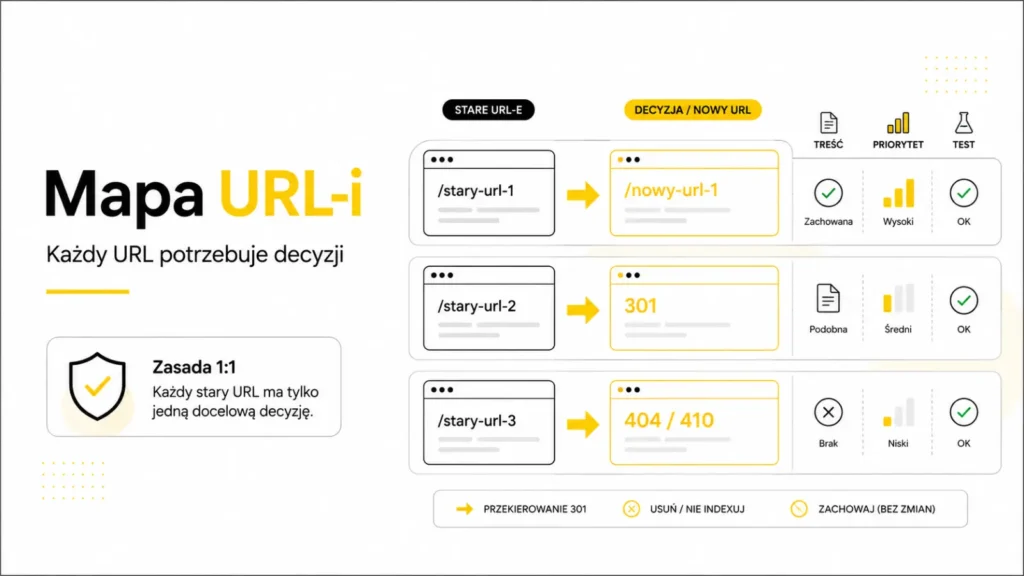
Each old URL should lead to the corresponding new page. You need to update internal links, canonical tags, and the sitemap. If content has been consolidated, several old URLs may point to a single new page, but only if that page has actually taken over their topic and function.
Domain change
Verify both domains in Search Console, implement redirects for all host variants, and update canonical tags, hreflang tags, the sitemap, and links. For domain migrations, Google provides the Change of Address tool. Redirects should remain active for at least one year, and from the users’ perspective, it’s often worth keeping them active longer.
Migration to a New CMS
The new system may generate different URLs, canonical tags, pagination, parameters, and structured data. You need to compare the code and behavior of all page types, not just the views. Special attention should be paid to automatic noindex rules, filters, language versions, and content rendered by JavaScript.
Changing Hosting Without Changing URLs
The most important factors are infrastructure performance, DNS, the certificate, CDN configuration, and Googlebot access. The new hosting must be tested in advance, and the old one should only be shut down once the logs show that users and bots are already using the new infrastructure.
Merging Multiple Websites
Do not redirect all pages from the acquired domains to a single subpage. Every piece of valuable content should have a thematically consistent counterpart. If similar content is consolidated, the new page must genuinely cover that scope, rather than merely serving as a general landing page.
Redesign Without Changing URLs
Keeping URLs unchanged reduces the risk, but does not eliminate it. Visibility may suffer due to content removal, header changes, rendering errors, limited linking, a degraded mobile version, or accidental “noindex” tags. Such a project also requires a comparative crawl before and after implementation.
Example from a large project
The scale of the migration determines the level of control required but does not change the fundamental principles. In the project described in the case study—involving the migration of over 16,000 subpages—the work included a redesign, reorganization of the information architecture, streamlining of the content structure, and technical preparation of the platform for further SEO development. With such a large number of URLs, manual inspection of individual pages is insufficient; therefore, rules, automated tests, and analysis of entire URL types are crucial.
Expert Insight: Migrate Relationships, Not Just Pages
The value of the old website lies not only in the content visible on the screen. It is also created by relationships: which URL is canonical, where links lead from, which search queries generate traffic, where users convert, and how the crawler navigates to subsequent sections.
A good migration recreates these relationships within the new structure and only then improves them. First, it ensures continuity; then, it organizes the architecture and enhances visibility. Attempting to fix everything at once can turn the project into a technical fog where it’s difficult to tell which decision improved the results and which one weakened them.
After migration, it’s worth continuing SEO optimization, but based on stabilized data and clearly documented changes—not by haphazardly tweaking the entire site all at once.
SEO Migration Mini-Checklist
- Was a full crawl of the old site performed and saved?
- Have URLs been collected from Search Console, analytics, the sitemap, the CMS, logs, and the backlink profile?
- Does every important old URL have a direct and thematically consistent counterpart?
- Are the redirects permanent, without loops or unnecessary chains?
- Have unrelated pages been redirected en masse to the homepage?
- Have key content, metadata, headers, and conversion elements been preserved?
- Do canonical tags, hreflang, and structured data point to the new URLs?
- Do robots.txt and noindex tags block the production version?
- Does the XML sitemap contain only valid, indexable URLs?
- Do internal links lead directly to the new pages?
- Have forms, transactions, GA4, GTM, and other events been tested?
- Can the new infrastructure handle increased crawling and traffic?
- Have plans been prepared for deployment, rollback, and monitoring?
- Have the most important pages been verified in Search Console after publication?
- Will redirects be maintained for a sufficiently long time?
FAQ
Is every website redesign an SEO migration?
No. Changing graphics or individual pieces of content usually does not require a full migration process. The risk increases when URLs, the domain, the CMS, hosting, rendering methods, information architecture, or a large portion of the content change.
Are 301 redirects enough to retain traffic?
No. They are one of the most important elements, but you also need to take care of the content, internal linking, canonical tags, sitemap, hreflang, structured data, accessibility for crawlers, and analytics functionality.
Do all old URLs need to be redirected?
It’s worth redirecting URLs that have appropriate new equivalents, traffic, links, or significance for users. Pages deleted without a meaningful replacement can return a 404 or 410 error instead of leading to an unrelated location.
Can all old pages be redirected to the homepage?
This is not a safe practice. Mass redirects to an unrelated homepage are confusing for users and may be treated as soft 404s. The destination page should correspond to the topic and function of the old URL.
How long should redirects be maintained after migration?
Google recommends keeping redirects in place for as long as possible, typically for at least one year. From the perspective of users and old links, it’s often worth leaving them in place indefinitely while updating your own links to the new addresses.
Does a drop in rankings after migration always indicate an error?
No. Temporary fluctuations may occur as Google recrawls and reindexes the site. However, you should not ignore a sudden drop limited to a specific directory, page type, or group of URLs.
When should you use the Change of Address tool in Search Console?
The tool is primarily intended for migrating from one domain or subdomain to another. It is not necessary for a simple switch from HTTP to HTTPS or for path changes within the same domain.
Is blocking the staging environment in robots.txt sufficient?
This is not a complete safeguard. Robots.txt does not protect content from users and may hinder crawl testing. It is safer to restrict access, for example, with a password, a VPN, or server rules.
Can low-quality content be removed immediately during migration?
Yes, but every decision should be data-driven. A page with low traffic may still contain links, cover an important topic, or drive conversions. Content can be improved, merged, redirected, or removed depending on its purpose.
How quickly will Google process the migration?
There is no set timeframe. Small and medium-sized websites may take a few weeks to migrate most URLs in the index, while large websites may take longer. The pace depends, among other things, on the number of URLs and server performance.
Summary
SEO migration is designed to preserve what already works and create a stable foundation for further growth. The most important document is the map of old and new URLs, but the project’s success also depends on content preservation, consistency of technical signals, the quality of testing, and the speed of response after implementation.
A secure process begins with an inventory of the old website, followed by designing the new architecture, URL mapping, redirects, and staging tests. After launch, it requires monitoring of indexing, traffic, conversions, and server errors. Only then can the new site be not only more visually appealing but also prepared to take over and build upon its existing visibility.
The most costly migration errors are usually simple: a missing redirect, a “noindex” tag left in place, an old canonical tag, or a deleted subpage that generated search queries. That is precisely why, during migration, precision and the sequence of actions are more important than the speed of launch.


