Robots.txt vs. noindex: How to Control How Google Indexes Your Site?


Controlling indexing isn’t about adding a single universal rule. First, you need to determine whether Google should avoid visiting a given URL, not include it in search results, designate a different version as the canonical one, or remove the URL from the site entirely. Each of these goals requires a different solution.
The robots.txt file controls crawlers’ access to specific paths. The noindex directive, on the other hand, affects a page’s presence in the index. Combining these mechanisms without understanding the order in which they operate can have the opposite effect of what is intended: Google may not recognize the noindex directive or may continue to display the URL itself.
This topic is particularly important during migrations, CMS changes, the implementation of test versions, and the reorganization of a complex website structure. In such situations, it’s worth including the monitoring of these directives as part of your SEO and SEM efforts.
You can find more practical resources on website visibility on our blog.
Key Information
- Robots.txt specifies which URLs a compliant crawler is allowed to access. It is not a tool for permanently removing pages from search results.
- The “noindex” tag informs search engines that a page or file should not be included in the index. For Google to recognize this rule, it must have access to the URL.
- Canonical tags, redirects, 404 or 410 status codes, and password protection address different issues than robots.txt and noindex. They should not be used interchangeably.
- After each change, you should check the server response, directives, canonical tag, and status of the URL in Google Search Console.
Crawling and indexing are two different stages
Google must first discover the URL, and then it may attempt to fetch it. Only after analyzing the content does it decide whether and in what form to include the page in the index. Crawling refers to a bot visiting a URL, while indexing involves processing and storing the information needed to display search results.
Google may be aware of a URL even if its content is blocked in robots.txt. The search engine can discover a URL through external links, internal linking, or a sitemap. In this case, the URL itself may appear in search results without a standard description, because Google knows the URL but was unable to fetch the content.
The `noindex` directive takes effect only after the page or file has been fetched. If the crawler cannot access the URL, it will not see the setting that excludes the page from the index. This is why simultaneously blocking a URL in robots.txt and setting it to noindex is one of the most common technical SEO mistakes.
What is robots.txt and what does it actually control?

Robots.txt is a public text file placed in the host’s root directory. The rules it contains inform crawlers which paths they may or may not crawl. The file does not block user access and does not protect against bots that do not follow the protocol.
The file’s scope is precise. The rules apply only to the same protocol, host, and port where the robots.txt file is located. This means that settings for the main domain do not necessarily apply to subdomains, a different protocol, or a separate version of the site.
Key Elements of robots.txt
- User-agent specifies the crawler to which the subsequent rules apply. A general entry can cover all robots that follow the protocol.
- “Disallow” specifies the paths that the crawler should not access.
- “Allow” lets you make an exception within a blocked section.
- Sitemap specifies the location of the XML sitemap. It neither blocks nor allows crawling, but helps provide the search engine with the sitemap’s URL.
- Paths are case-sensitive, so two seemingly similar rules may apply to different URLs.
- Google does not support the `crawl-delay` or `noindex` directives in `robots.txt`.
In practice, robots.txt can restrict crawlers’ access to the admin panel, internal search results, or specific parameters. However, this does not mean that such URLs will be automatically removed from the index.
When should you use robots.txt?
Using a robots.txt file makes sense when the main goal is to restrict crawling of specific groups of URLs or files. It is particularly useful for large and technically complex websites.
- limiting the crawling of internal search results and a very large number of parameter combinations,
- blocking technical paths that are irrelevant to search engines,
- controlling access by specific crawlers to selected sections,
- limiting crawl traps, such as calendars that generate an unlimited number of URLs,
- temporarily reducing the number of URL variants fetched after prior analysis of the site structure.
However, you should not block CSS and JavaScript files needed for the page to render correctly. If Google cannot fetch the resources necessary to understand the layout or content, the page analysis may be less accurate.
What is robots.txt not intended for?
- to protect confidential or private data,
- to permanently remove pages from search results,
- to specify the canonical version of a URL,
- to redirect users and bots to a new URL,
- to hide a test version of a website from people who know its address.
If content cannot be made publicly available, you’ll need authentication, login requirements, IP-based access restrictions, or other server-level security measures. The robots.txt file is public and may even reveal path names that the site owner does not want to expose.
What is noindex and how do you implement it?
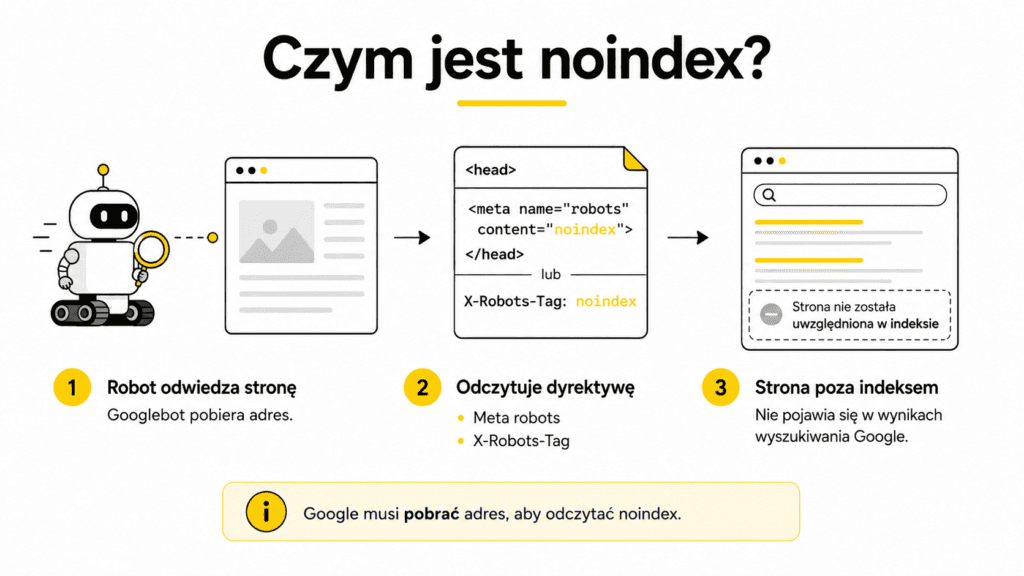
Noindex is an indexing directive. It informs search engines that support this rule that a given page or resource should not appear in search results. Users can still access the URL directly, and the file itself may be publicly available.
For HTML pages, `noindex` is most commonly set in the page’s metadata. The rule can apply to all robots that support this command or exclusively to Googlebot. In practice, the choice depends on whether the page is to be excluded from all search engines or only from Google’s results.
For non-HTML files, such as PDFs, images, or videos, `noindex` can be specified in the server’s response header using the `X-Robots-Tag` setting. Both solutions serve the same purpose. They differ only in how they are implemented and the type of resource for which they are most practical.
In any case, Googlebot must be able to access the URL. If a page or file is blocked in robots.txt, the search engine may not see the `noindex` directive.
When is `noindex` the right solution?
- thank-you pages after submitting a form,
- internal search results that do not constitute valuable landing pages,
- public utility subpages that must function but should not receive traffic from Google,
- selected archives or page variants with no standalone search value,
- PDF files and other resources that should be accessible via a link but shouldn’t appear in search results.
“Noindex” should not be the automatic solution for every low-quality page. Sometimes SEO optimization is more appropriate: improving the content, merging several URLs, specifying a canonical version, or setting up a redirect. The decision should be based on the URL’s function, not on the desire to quickly hide the problem.
How long does it take for a page to be removed after adding “noindex”?
The change isn’t immediate. Google must revisit the URL and read the directive. For a single important page, you can request a re-check of the URL in Google Search Console. With a large number of pages, you’ll need to monitor the indexing report and wait for the next crawl.
If you need to hide a result quickly and temporarily, you can use the Removal tool in Search Console. This block is not a permanent solution and must be combined with `noindex`, content removal, or access restrictions.
Robots.txt vs. noindex: The Key Difference
- Robots.txt determines whether a crawler can access specific paths.
- “noindex” determines whether an accessible page or file should be included in the index.
- A URL blocked in robots.txt may still be known to Google and appear in search results without a standard description.
- A URL marked with noindex should disappear from search results after the search engine re-crawls and processes the page.
- Noindex does not protect content from users. Robots.txt is also not an access control measure.
Robots.txt, noindex, canonical, redirect, or 404?
The most common mistakes stem from trying to solve different problems with a single mechanism. Before implementation, you need to define the target state of the URL.
- If a crawler should not crawl a large group of URLs, robots.txt may be the appropriate tool.
- If a page is supposed to be live but shouldn’t appear in search results, `noindex` is the right choice.
- If several URLs have the same or very similar content, you should specify the canonical version.
- If the content has been permanently moved, a permanent redirect should be used.
- If a resource has been permanently deleted and has no equivalent, it should return a 404 or 410 status code.
- If the content is to be accessible only to selected users, a login, password, or other access control is required.
- If you need to quickly hide a result from Google, the Removal Tool can provide a temporary solution, but you must implement a permanent solution at the same time.
Common mistakes with robots.txt and noindex
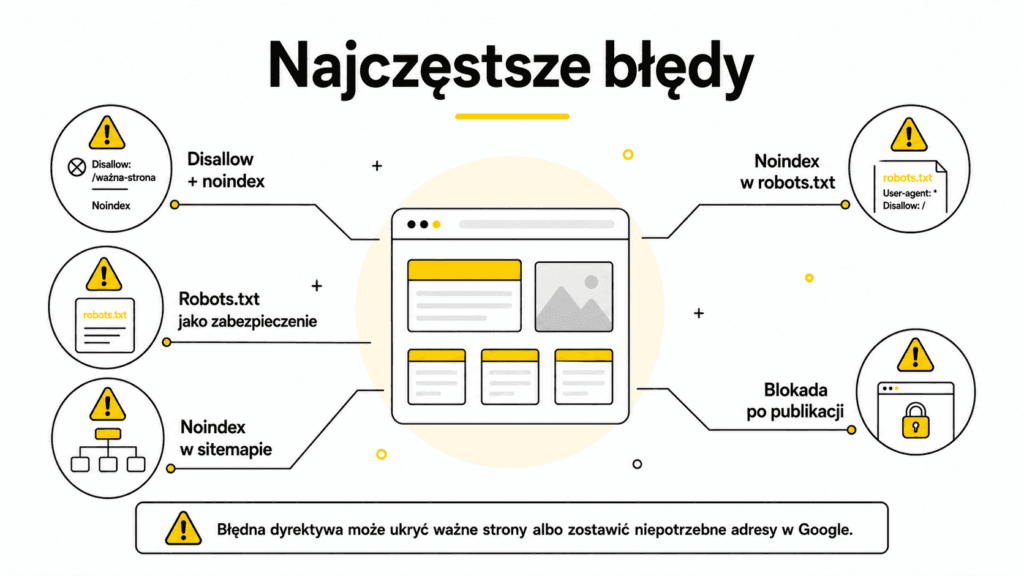
- Blocking a URL in robots.txt while simultaneously setting it to noindex. The crawler cannot fetch the page, so it may not see the noindex directive.
- Adding `noindex` directly to the `robots.txt` file. Google does not support this usage.
- Treating robots.txt as a security measure. The file is public; it does not block users and does not have to be respected by all bots.
- Leaving the block in place after publication. Test environment settings are sometimes carried over to production and can prevent the entire site from being indexed.
- Using “noindex” instead of a canonical tag. With duplicate content, the goal is usually to consolidate signals, not simply to hide variants.
- Including noindexed URLs in the XML sitemap. The sitemap should list canonical URLs and those intended for indexing.
- A global `noindex` setting in a template, CMS, or at the server level. A single inherited rule can affect hundreds of important subpages.
- Blocking resources needed for rendering. Blocked CSS or JavaScript files can make it difficult for Google to view the page correctly.
How can you determine why a page is or isn’t being indexed?
It’s best to follow a consistent order when diagnosing the issue. This prevents you from confusing problems with crawler access, indexing directives, canonical tags, and page quality.
- Determine the expected status of the URL: indexed, excluded from the index, redirected, deleted, or simply restricted from crawling.
- Check the robots.txt file under the correct host and protocol. Pay attention to wildcard rules, case sensitivity, exceptions, and behavior on subdomains.
- Check the server response status. A functioning page should return a 200 status code, a redirect should return a 3xx status code, and a deleted resource should return a 404 or 410 status code.
- Check the indexing settings generated by the CMS, plugins, and server. Verify that there is no “noindex” tag on the page or in the server response.
- Check the canonical tag. It should point to the correct, accessible, and indexable URL, and other signals should not contradict it.
- Use the URL Inspection tool in Google Search Console. Compare the version in the index with the live page.
- Review the indexing report and information regarding robots.txt. For larger websites, look for recurring patterns rather than just isolated errors.
- Check the XML sitemap and internal linking. Don’t direct Google to pages that you’re simultaneously excluding from the index without a clear reason.
- After making the changes, test the URL again and monitor the results. Correct configuration doesn’t necessarily mean Google has had time to recrawl it yet.
Practical Scenarios and Appropriate Solutions
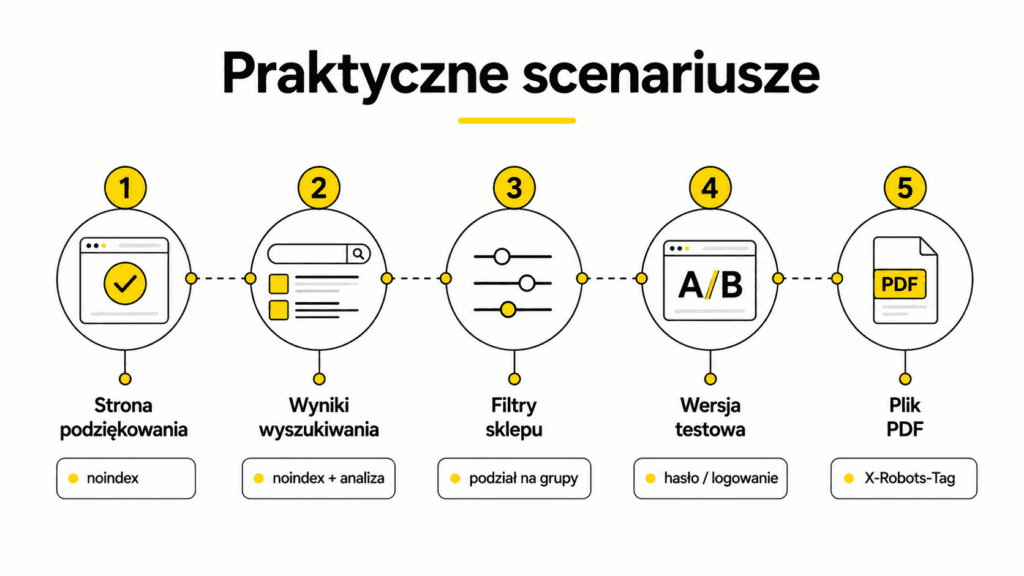
Thank-you page after submitting a form
The page must be accessible to users, but it generally shouldn’t appear in search results. Most often, the correct solution is to set `noindex`, allow crawling, and remove the URL from the XML sitemap. `robots.txt` does not solve the indexing issue here.
Internal search results
Such URLs often generate a huge number of low-value combinations. If some of them are already in the index, you should first allow Google to crawl them and then apply `noindex`. Only after removing them from the index should you consider limiting further crawling via `robots.txt`, if the sheer volume of URLs is actually overloading the site.
Filters in an online store
Not every filter should be automatically blocked or marked with `noindex`. Some combinations correspond to real search queries and may warrant separate, indexable category pages. Others create random sorting variations, price ranges, or redundant combinations with no value.
First, you need to divide the URLs into groups: valuable landing pages, duplicates, technical variants, and crawl traps. Only then can you choose between canonical tags, noindex, robots.txt, link restructuring, or changing how URLs are generated. This is part of a broader SEO strategy, not a single rule that applies to all filters.
Test version or staging environment
The safest solution is to restrict access via login, password, VPN, or server rules. The robots.txt file alone reveals the path and does not secure the content. The noindex tag alone still allows people who know the address to open the page. After publication, you must verify that test restrictions have not been carried over to the production version.
Discontinued product
The choice depends on the situation. If a direct equivalent exists, you can redirect the user to the most similar product or category. If the page still helps users, it can remain accessible with a note about its unavailability and alternatives. When a product has been permanently removed and there is no equivalent, a 404 or 410 status code is the correct response. The “noindex” tag should not replace a decision regarding the future of the URL.
A PDF file that should not appear in Google
For PDF files, the `noindex` directive is most often passed in the server response header using the `X-Robots-Tag`. Googlebot must be able to fetch the document to see this directive. If the file contains confidential information, `noindex` alone is not enough, and access must be secured.
Expert Insight: The order of actions matters when removing URLs
If a URL is already visible on Google but is ultimately not supposed to be indexed or crawled extensively, you should not immediately block it in robots.txt. Google must first see the “noindex” directive.
- Remove the existing robots.txt block for this group of URLs.
- Enable the `noindex` tag in your website settings, CMS, or server response.
- Make sure the URL returns a 200 status code and is accessible to Googlebot.
- Remove the URLs from the XML sitemap and limit unnecessary internal linking.
- Wait for Google to revisit the pages and remove them from the index.
- Only then should you consider blocking crawling if the URLs continue to generate unnecessary load.
This two-step process is particularly useful for large sets of search results, parameters, and archives. It allows you to first send Google a clear indexing signal and only later limit crawl resource consumption.
Mini-checklist before implementation
- Do you know exactly what the target state should be for each type of URL?
- Is the robots.txt file located under the correct host, protocol, and port?
- Do the blocking rules exclude any important pages or resources needed for rendering?
- Is the URL with the “noindex” tag accessible to Googlebot?
- Has `noindex` been implemented in the page settings or server response, rather than in `robots.txt`?
- Are the response status, canonical tags, and redirects consistent with the intended purpose?
- Does the XML sitemap contain only URLs intended for indexing and canonical versions?
- Do the mobile version, CMS templates, and server settings add any other directives?
- Has the change been tested in Google Search Console?
- Is a re-crawl scheduled after implementation?
FAQ
Does robots.txt remove a page from Google’s index?
No. It blocks crawling by compliant robots, but Google may still be aware of the URL from links or other sources and display the URL itself without the standard description. To exclude a page from search results, use `noindex`, remove the content, or restrict access.
Will `noindex` work if the URL is blocked in `robots.txt`?
Google may not be able to read the directive because it won’t be able to fetch the page or the server’s response. As a result, the URL may remain visible, especially if the search engine knows it from links.
Can you add “noindex” directly to robots.txt?
No. Google does not support `noindex` in the `robots.txt` file. The directive must be implemented in the site’s settings or in the server response header.
Does the canonical tag replace “noindex”?
No. The canonical tag indicates the preferred version among a group of similar or duplicate URLs. “noindex” specifies that a particular URL should not be included in the index.
Should a page with “noindex” be included in the sitemap?
Usually not. An XML sitemap should list canonical URLs intended for indexing. Including a URL with the `noindex` directive in a sitemap creates conflicting signals and makes analysis more difficult.
Does `noindex` protect confidential data?
No. The page can still be accessed by typing in the URL and may be crawled by other systems. Confidential content must be secured through authentication or access restrictions.
How do I exclude a PDF file from the index?
The most common method is to use the X-Robots-Tag in the server response. Googlebot must be able to fetch the file to see this directive.
How can I check if Google sees the robots.txt file and the “noindex” directive?
It’s best to use the robots.txt report and the URL Inspection tool in Search Console. It’s a good idea to compare the data on the version in the index with a test of the live page.
Why isn’t a page being indexed even though there’s no “noindex” tag or robots.txt block?
The absence of blocks does not guarantee indexing. Google may not know the URL, consider it a duplicate, choose a different canonical URL, encounter a rendering issue, or not consider the page valuable enough to index.
Summary
Robots.txt and noindex are not interchangeable tools. The first mechanism controls whether a crawler can fetch URLs, while the second controls their presence in the index. The most important rule is: Google must be able to visit the page to read the noindex tag.
In practice, controlling indexing requires a broader approach. Duplicate pages are managed with a canonical tag, moved pages with redirects, deleted resources with a 404 or 410 status code, and private content with access restrictions. Only by correctly matching the mechanism to the goal can you avoid situations where important pages disappear from Google or unnecessary URLs remain in the search results.
After every change, you need to check the actual server response, indexing settings, canonical tags, the XML sitemap, and the data in Search Console. In technical SEO, a single small change can affect the visibility of thousands of subpages, which is why precision is more important than rushing to implement changes just in case.
See also: Internal Linking: How to Plan Your Site’s Link Structure?


