Internal Linking: How to Plan Your Website’s Link Structure?


Internal linking is one of those SEO elements that often seem simple—until you have to plan them for an entire website. A link shouldn’t just be a decorative element in the text. It should guide the user to the next logical step and help Google understand the relationships between subpages.
Well-designed links connect the blog, services, case studies, and offer pages. This way, an educational article can lead to an SEO audit, a post about leads can lead to lead generation, and content about a service page can lead to web design projects.
The problem arises when linking is haphazard: sometimes to the homepage, sometimes to an unrelated service, and sometimes to an old post without any context. In such cases, the user can’t see a clear path, and the search engine crawler receives a weak signal about the site’s structure.
You can find more content like this on our blog.
Key Takeaways
Internal linking is a system of connections between subpages within a single domain. In SEO, it serves two purposes: it helps users navigate to the next piece of valuable content and helps search engines discover and interpret the site’s structure.
The most important thing isn’t just adding links, but choosing the right location, anchor text, and direction. A link should flow naturally from the context, rather than being tacked onto the end of a paragraph.
Well-planned linking supports topical authority, reduces cannibalization, and improves user flow between educational content and the offer.
What are the benefits of internal linking?

Internal linking strengthens the website’s structure. It makes it easier to reach important subpages, allows you to build clusters, and indicates which content is central to a given topic.
- It facilitates crawling and the discovery of URLs,
- guides users to related content,
- strengthens service pages from the blog,
- organizes the relationships between articles,
- and helps reduce the number of orphaned pages.
How to choose anchor text?
The anchor text should naturally describe the page it links to. Instead of “click here,” it’s better to use specific text, such as “SEO audit,” “content marketing,” or “customer journey and SEO.”
Google emphasizes that links should be crawlable, and the link text should help convey the context. In practice, this means that the anchor text is part of the information about the destination page, not just a UX element.
How should you link from a blog to services?

Educational content should lead to a service when the user might need support after understanding the problem. An article about content can naturally link to content marketing, an article about copywriting to copywriting, and a piece about campaigns to Google Ads.
The most important thing is timing. A link to a service shouldn’t interrupt the flow of thought. It should appear when the content highlights a problem that the reader might not be able to solve on their own.
What mistakes should you avoid?
- linking many different anchor texts to the same subpage without a strategy,
- adding all links in a single paragraph,
- linking to pages unrelated to the topic,
- omitting older, valuable blog posts,
- failing to include links from supporting articles to pillar pages.
It’s worth regularly analyzing your linking structure during an SEO audit, especially when your blog already has several dozen posts. At that point, it’s easy to overlook content that’s valuable but doesn’t receive enough traffic from other pages.
Expert Insight
Good internal linking isn’t just a mechanical task to check off a list. It’s about designing pathways. Users should feel that each link helps them delve deeper into the topic, rather than distracting them.
The best results come from planning links as early as the article brief stage. That way, the text naturally leads to related services and posts, rather than artificially adding links after the work is done.
How should you place internal links in an article?

The best internal linking doesn’t look like a list of links tacked onto a paragraph. A link should appear exactly where the user might need to explore the topic further or move on to the next step. If the text mentions technical analysis, a natural next step might be an audit. If it describes content creation, a logical next step might be content marketing.
It’s a good idea to plan the placement of links alongside the narrative. In the introduction, you can link to a blog post; in the problem section, to an article explaining the context; in the practical section, to a service; and in the conclusion, to the next step in the process. This way, the user doesn’t feel like the links are interrupting their reading. Instead, they guide the user further.
- Link only when the link expands on the section currently being discussed;
- don’t group multiple links into a single unnatural sentence,
- avoid meaningless anchor text, such as “here” or “more,”
- link blog posts to services only when it makes sense in the context,
- regularly update links after publishing new content.
What does good anchor text look like?
Anchor text should be short, descriptive, and consistent with the content of the landing page. If a link leads to an SEO audit service, the anchor “SEO audit” is clear. If it leads to an article about the customer journey, the anchor should hint at the topic rather than hide it behind a generic phrase.
It’s best to avoid two extremes. The first is an anchor that’s too general, which says nothing about the link’s destination. The second is an over-optimized anchor that unnaturally repeats a phrase everywhere. Good internal linking should support the user, not pretend that the text is written to please an algorithm.
How can you measure whether linking is helping?
You can assess the impact of linking in several places. In Google Search Console, check whether linked pages are gaining impressions and clicks. In crawling tools, you can analyze click depth, the number of internal links, and orphaned pages. In GA4, it’s worth observing whether users navigate between content and whether they reach contact or service pages.
- Check whether important URLs have links from related content,
- Remove or correct links leading to outdated pages,
- monitor pages with no inbound links from other subpages,
- Compare user behavior before and after changes,
- combine SEO data with conversion data, not just the number of links.
Example of Application in a Real-World Project
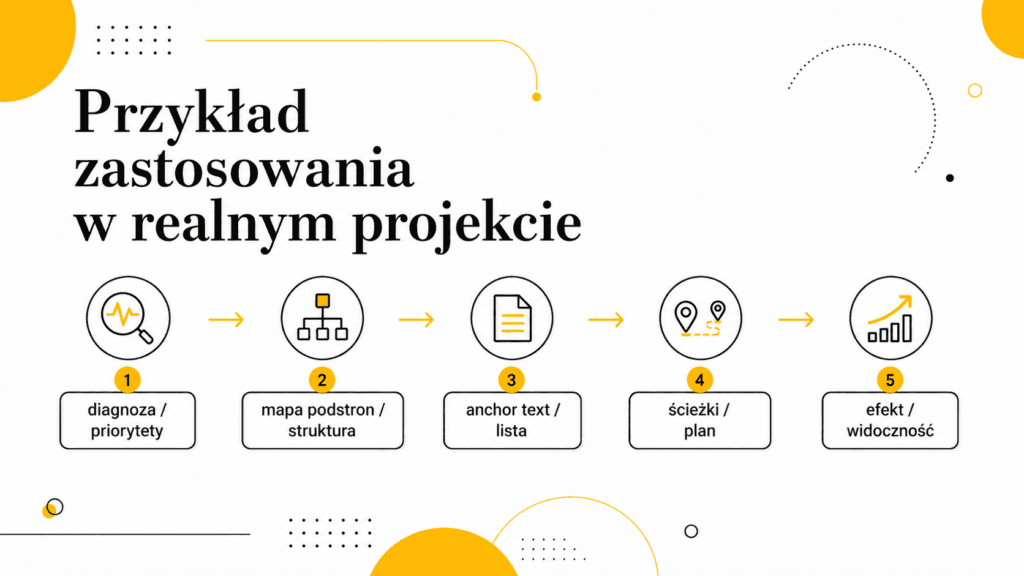
Let’s imagine a situation where a blog already has many posts, but after reading the text, users do not proceed to services or related content. At first glance, this might seem like a single technical or editorial issue, but in practice, it usually involves several layers at once: content, structure, data, UX, and business objectives. That’s precisely why internal linking shouldn’t be analyzed in isolation from the entire website.
The best approach starts with a diagnosis. Before creating a to-do list, you need to determine what is actually hindering results: a lack of content, an unclear structure, poor measurement, incorrect implementation, or a mismatch with user intent. Only then can you decide which actions have the highest priority and how to measure their impact.
In practice, the process involves: mapping subpages, selecting anchor text, and organizing navigation paths between content. This approach prevents you from haphazardly fixing everything at once. Instead, it allows you to select the elements that have the greatest impact on visibility, traffic quality, conversion, or user decision-making.
How can you deepen your analysis before implementation?
Before implementation, it’s worth asking a few key questions. Thanks to them, internal linking ceases to be just a buzzword and becomes a concrete decision-making process. The answers to these questions should be based on data, sources, user behavior, and an analysis of the current site structure.
- What user problem is this change intended to solve?
- Does the current page already partially address this intent, or is new content or a redesign needed?
- What data confirms that the problem actually exists?
- Which subpages, forms, campaigns, or content will be affected by the change?
- How will the impact be measured after implementation?
- Will the change cause new cannibalization, duplication, or a deterioration in UX?
Mini-quality checklist before publication or implementation

- The content addresses the main intent, rather than merely defining a concept;
- Headings guide the user from the problem to the solution,
- examples illustrate real-life situations, not abstract ones,
- Practical sections explain what to do and why,
- The FAQ answers the reader’s questions, not the needs of the author,
- sources support specific parts of the content rather than serving as a random bibliography.
If the text meets these conditions, internal linking is explained not only correctly but also usefully. This is what distinguishes an expert article from a basic SEO post: the user doesn’t finish reading with just a definition, but with a real understanding of the problem and possible actions.
FAQ
How many internal links should an article have?
There’s no single ideal number. What’s more important is whether each link makes sense. For an in-depth blog post, five or more links can be natural if they lead to genuinely related content.
Can you link to the same page multiple times?
Yes, but there’s usually no need to do so in a short article. It’s better to choose one strong, natural anchor text and a spot where the link actually helps the reader.
Does internal linking affect indexing?
Yes, it can help search engine crawlers discover subpages and understand their importance within the site’s structure. However, it does not replace proper indexability, a sitemap, or good site architecture.
Summary
Internal linking combines SEO, UX, and content strategy. It helps users navigate the site and helps Google better understand the site’s structure.
The best links are invisible in the sense that they don’t interfere with reading. They simply lead the user further, exactly where they should go after reading a given section of text.
Read also: Content Gaps in SEO: How to Find Topics Missing from Your Site?


